Logo博塔布 @@@九月@@@ BoTab - 一鍵將書籤轉換為新標籤頁 @@@九月@@@ BoTab 是一款智能瀏覽器擴展程序,只需點擊一下即可將您的書籤內容轉換為精美的新標籤頁和導航頁,讓您保存的珍寶可訪問,讓您的瀏覽更加高效。 @@@九月@@@ 高級版 @@@九月@@@ 登錄 @@@九月@@@ 退出 @@@九月@@@ 註冊 @@@九月@@@ 切換語言 @@@九月@@@ 每天上午 9:01 @@@九月@@@ 切換模式 @@@九月@@@ 光 @@@九月@@@ 黑暗 @@@九月@@@ 系統 @@@九月@@@ 複製 @@@九月@@@ 正在保存... @@@九月@@@ 保存 @@@九月@@@ 正在加載... @@@九月@@@ 取消 @@@九月@@@ 退出失敗 @@@九月@@@ 共有 __PH_0__ 條記錄 @@@九月@@@ 沒有結果 @@@九月@@@ 正在加載... @@@九月@@@ 專欄 @@@九月@@@ 每頁行數 @@@九月@@@ 頁面 @@@九月@@@ 第一頁 @@@九月@@@ 最後一頁 @@@九月@@@ 下一頁 @@@九月@@@ 上一頁 @@@九月@@@ 升序
  • 部落格
  • 文件
  • Discord

開始使用 BoTab

立即體驗一鍵將書籤轉換為新標籤頁,讓您的瀏覽更高效

Chrome立即下載 Chrome了解更多
支持 Chrome、Edge 和所有基於 Chromium 的瀏覽器
您的浏览器不支持视频播放。
Logo博塔布 @@@九月@@@ BoTab - 一鍵將書籤轉換為新標籤頁 @@@九月@@@ BoTab 是一款智能瀏覽器擴展程序,只需點擊一下即可將您的書籤內容轉換為精美的新標籤頁和導航頁,讓您保存的珍寶可訪問,讓您的瀏覽更加高效。 @@@九月@@@ 高級版 @@@九月@@@ 登錄 @@@九月@@@ 退出 @@@九月@@@ 註冊 @@@九月@@@ 切換語言 @@@九月@@@ 每天上午 9:01 @@@九月@@@ 切換模式 @@@九月@@@ 光 @@@九月@@@ 黑暗 @@@九月@@@ 系統 @@@九月@@@ 複製 @@@九月@@@ 正在保存... @@@九月@@@ 保存 @@@九月@@@ 正在加載... @@@九月@@@ 取消 @@@九月@@@ 退出失敗 @@@九月@@@ 共有 __PH_0__ 條記錄 @@@九月@@@ 沒有結果 @@@九月@@@ 正在加載... @@@九月@@@ 專欄 @@@九月@@@ 每頁行數 @@@九月@@@ 頁面 @@@九月@@@ 第一頁 @@@九月@@@ 最後一頁 @@@九月@@@ 下一頁 @@@九月@@@ 上一頁 @@@九月@@@ 升序

讓您的書籤更智能

TwitterX (Twitter)DiscordLinkedInEmail
產品
  • 特徵
  • 定價
  • 常問問題
資源
  • 部落格
  • 文件
  • 變更日誌
合法的
  • Cookie 政策
  • 隱私政策 @@@九月@@@ 服務條款 @@@九月@@@ 計費 @@@九月@@@ 製作人員 @@@九月@@@ 設置 @@@九月@@@ 管理員 @@@九月@@@ 用戶 @@@九月@@@ 注意:演示用的數據是偽造的,部分功能被禁用 @@@九月@@@ 獲取用戶失敗 @@@九月@@@ 搜索用戶... @@@九月@@@ 沒有找到用戶 @@@九月@@@ 專欄 @@@九月@@@ 名稱 @@@九月@@@ 電子郵件 @@@九月@@@ 角色 @@@九月@@@ 創建於 @@@九月@@@ 客戶編號 @@@九月@@@ 狀態 @@@九月@@@ 封禁原因 @@@九月@@@ 禁令到期 @@@九月@@@ 管理員 @@@九月@@@ 用戶 @@@九月@@@ 電子郵件已驗證 @@@九月@@@ 電子郵件未驗證 @@@九月@@@ 電子郵件已復製到剪貼板 @@@九月@@@ 禁止 @@@九月@@@ 活躍 @@@九月@@@ 不活躍 @@@九月@@@ 清除搜索 @@@九月@@@ 加入於
  • 服務條款
© 2021–2025 博塔布 @@@九月@@@ BoTab - 一鍵將書籤轉換為新標籤頁 @@@九月@@@ BoTab 是一款智能瀏覽器擴展程序,只需點擊一下即可將您的書籤內容轉換為精美的新標籤頁和導航頁,讓您保存的珍寶可訪問,讓您的瀏覽更加高效。 @@@九月@@@ 高級版 @@@九月@@@ 登錄 @@@九月@@@ 退出 @@@九月@@@ 註冊 @@@九月@@@ 切換語言 @@@九月@@@ 每天上午 9:01 @@@九月@@@ 切換模式 @@@九月@@@ 光 @@@九月@@@ 黑暗 @@@九月@@@ 系統 @@@九月@@@ 複製 @@@九月@@@ 正在保存... @@@九月@@@ 保存 @@@九月@@@ 正在加載... @@@九月@@@ 取消 @@@九月@@@ 退出失敗 @@@九月@@@ 共有 __PH_0__ 條記錄 @@@九月@@@ 沒有結果 @@@九月@@@ 正在加載... @@@九月@@@ 專欄 @@@九月@@@ 每頁行數 @@@九月@@@ 頁面 @@@九月@@@ 第一頁 @@@九月@@@ 最後一頁 @@@九月@@@ 下一頁 @@@九月@@@ 上一頁 @@@九月@@@ 升序 All Rights Reserved.
Back to all features

Navigation workspace

Multi-column navigation built from your bookmarks, with Quick Directory jumps and card actions.
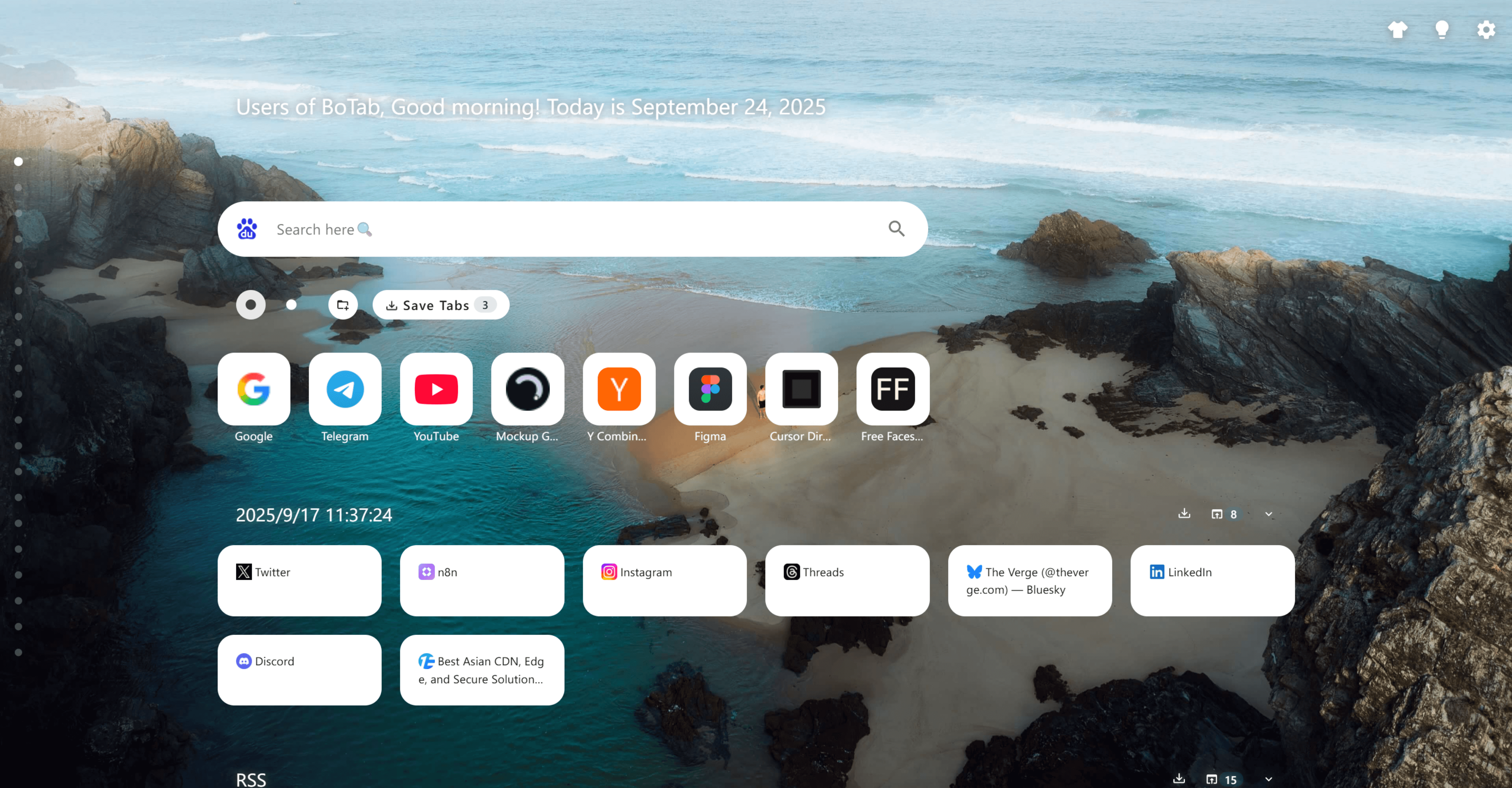
Navigation workspace

Key capabilities

Navigation workspace

BoTab turns bookmark folders into a scannable multi-column board—sections, cards, and a Quick Directory so you can jump by category and manage items in place. Because it’s still native bookmarks under the hood, your setup stays portable, familiar, and sync-friendly.
Bookmark-to-board generation
01

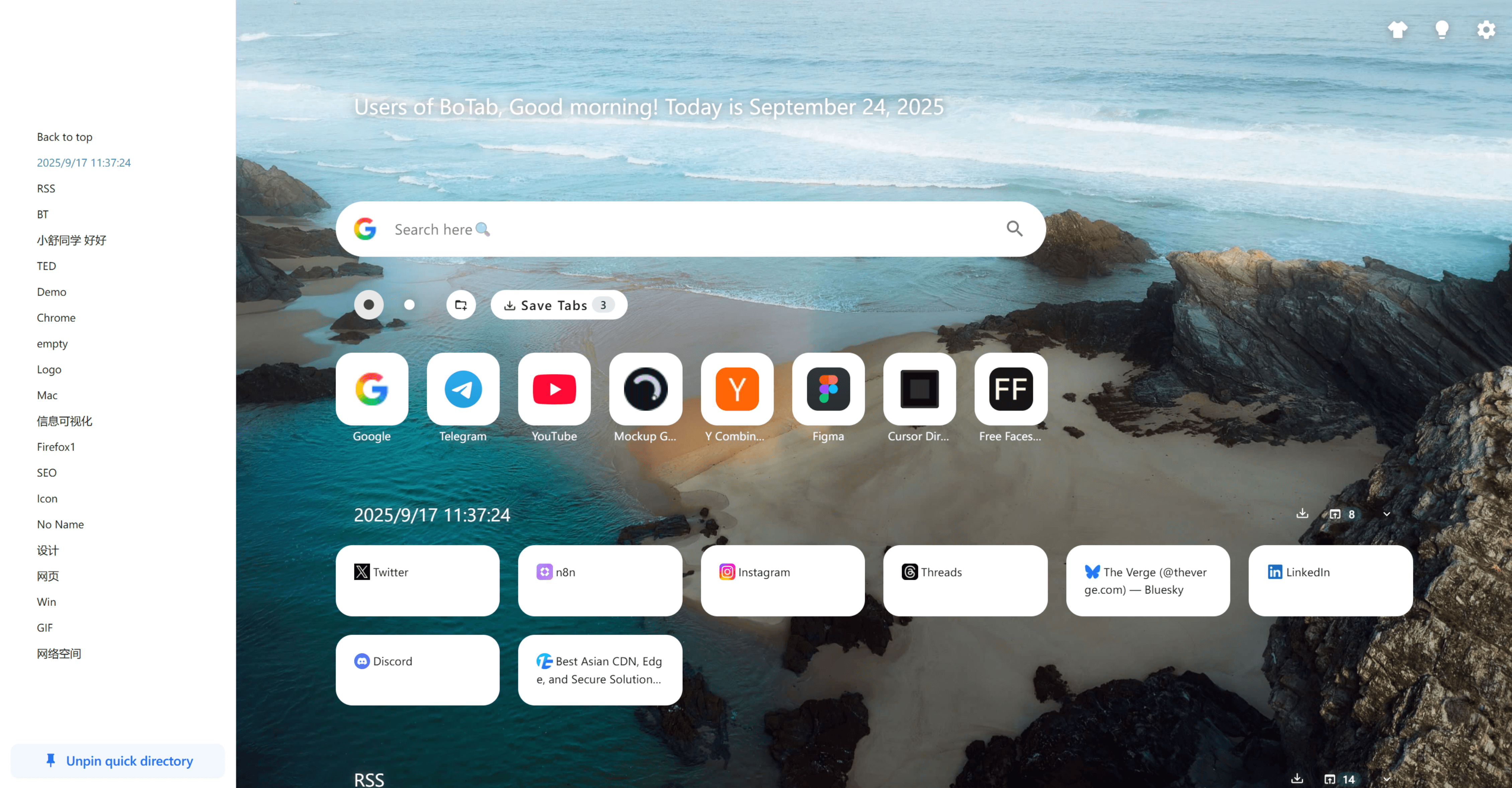
Bookmark-to-board generation

Generate a structured start page from bookmark folders so your saved links become scannable cards.
Quick Directory navigation
02

Quick Directory navigation

Pin common categories on the left and jump to any section without endless scrolling.

03

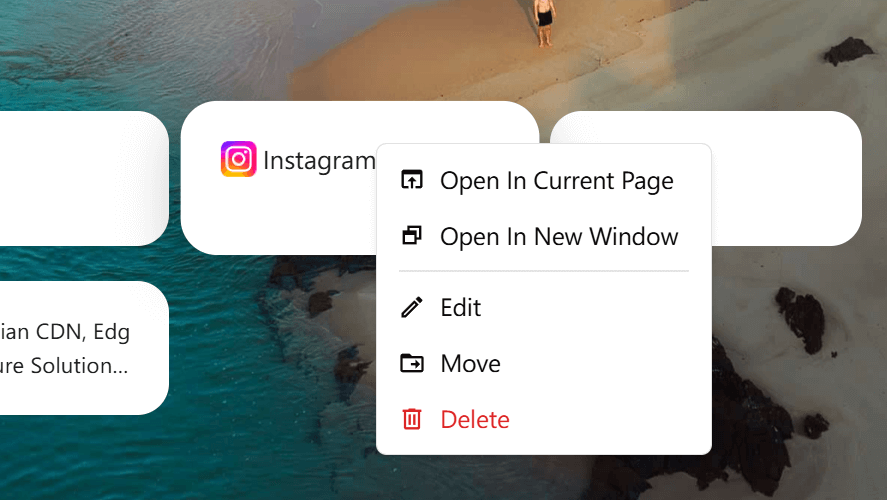
Card actions menu

Open in current tab/window, edit title/icon, move to another folder, or delete—right from the page.

04

Search-first entry point

Keep search and navigation in one place so the new tab page is both a launcher and an index.

05

Bulk organization

Use sorting, filtering, and multi-select behaviors to clean up collections without friction.

06

Sharing-ready boards

Turn a folder into a presentable board you can share as a curated resource list.

How it works

1. Organize bookmarks into folders

Group links by project or category (e.g., RSS, design, tools) using your browser bookmarks.

2. Open a new tab

BoTab generates a multi-column board from your bookmark structure and keeps it easy to scan.

3. Jump and search

Use Quick Directory anchors and search to land on the right section immediately.

4. Manage items in place

Right-click a card to edit, move, delete, or choose how to open it.

5. Keep boards fresh

When you have a useful set of tabs open, save them into a folder to update the board in one go.

Use cases

Research hubs

Keep articles, papers, and tools grouped per topic with quick jumps between sections.

Work vs. personal contexts

Separate categories like “Design”, “Dev”, “Finance” and switch instantly from the new tab page.

Team onboarding lists

Share a folder-backed board as a starter pack of links for new teammates.

Daily start page

Put your top sites, folders, and shortcuts on a single page that feels like a dashboard.

FAQ

No. It builds navigation pages from your existing browser bookmarks, so you keep the native structure and sync.

Yes—use the per-card menu to edit, move, or delete without leaving the page.

That’s the point: Quick Directory and multi-column layouts keep large libraries usable and fast to browse.

You can share a curated set of links by treating a folder as a board and sharing that collection.

Explore more

Sessions & recovery

Save whole-window sessions, restore them as groups, and recover after crashes.

Personalization & themes

Themes, wallpapers, and layout controls (plus optional CSS tweaks).

Privacy, backup & sync

Local-first, minimal permissions, with export/import backups.